

Support QuickBooks Desktop without writing a Desktop integration.
TenkeyBridge is a QuickBooks Online–compatible REST API for QuickBooks Desktop & Enterprise. Same endpoints, same OAuth2 flow, same query language — point the QBO integration you already have at a Desktop company file.
Code example: switching the API base URL, then querying invoices.
Removed: const BASE = "https://quickbooks.api.intuit.com";
Added: const BASE = "https://api.tenkeybridge.com";
// everything below this line is unchanged
GET /v3/company/{realmId}/query?query=SELECT * FROM Invoice
Authorization: Bearer {access_token}
$ node query-invoices.js
{ "QueryResponse": { "Invoice": [{
"Id": "2FBE8",
"DocNumber": "1091",
"CustomerRef": { "name": "Rock Castle Construction" },
"TotalAmt": 1005.00
}] } }
WHY TENKEYBRIDGE
Not another Desktop API.
Every Desktop API on the market — including the good ones — is a second integration: new object types, new auth, new quirks, maintained forever next to your QuickBooks Online code. TenkeyBridge is the opposite bet: you already wrote a QBO integration, or you're about to. Point it at Desktop and you're done. Desktop support's marginal cost is zero extra code — and that stays true for every app you ship after this one.
QuickBooks Web Connector
SOAP, polling, hand-written qbXML. The suffering this product exists to abolish — we speak it for you, so hosted desktops work with zero installs.
Desktop-native APIs
Modern and typed — but a second API surface, a second auth model, and a second quirk set alongside the QBO integration you still have to write.
TenkeyBridge
The QBO integration you were writing anyway. Same REST shapes, same tokens, same SDKs. Base-URL swap and a consent page.
DEVELOPER EXPERIENCE
Obsessed with the developer experience.
QBO-compatible surface
Your existing Intuit SDKs, your existing request code, your existing mental model. If it works against QBO, it works here.
npm install @tenkeybridge/client
A typed client for teams that want one — the raw REST surface never requires it.
Live playground
Fire the same call at Intuit's QBO sandbox and at the TenkeyBridge developer sandbox, side by side, differences highlighted.
Free developer sandbox
Every organization gets a sandbox realm seeded with a fictional company. Build and test against the same API with no QuickBooks install, then connect a real company file when you're ready.
AI-ready docs
llms.txt and an AI quickstart, so your coding agent integrates Desktop support in one session.
Built for sync engines
Change Data Capture and batch operations, QBO-shaped, for apps that mirror company files.
Honest compatibility
Every entity, field, and quirk documented. What can't map fails loud with a reason — never a silent drop.
ERROR HANDLING
Masterful error handling.
QuickBooks Desktop's native errors are cryptic, inconsistent, and often wrong about their own cause. TenkeyBridge normalizes every Desktop fault into the QBO fault shape your code already handles — then goes further: every error carries a tkb block with plain-English causes, concrete fixes, and a deep link into the docs.
{ "Fault": { "Error": [ { "Message": "Invalid Reference Id", "Detail": "CustomerMemo: QuickBooks Desktop only accepts a customer message that exactly matches its Customer Message list. See https://docs.tenkeybridge.com/compatibility/#invoice", "code": "2500", "element": "Invoice.CustomerMemo" } ], "type": "ValidationFault" }, "time": "2026-07-30T18:04:11.203Z",TenkeyBridge enrichment — outside the QBO fault shape: "tkb": { "code": "2500", "causes": [ "Desktop validates CustomerMemo against the Customer Message list; QBO accepts free text." ], "fixes": [ "Send an existing Customer Message, or add this text to the list in QuickBooks first." ], "docsUrl": "https://docs.tenkeybridge.com/compatibility/#invoice" }}END USERS
Effortless for the people running QuickBooks.
Nothing to install
Your customer opens one file in QuickBooks' built-in Web Connector — the same tool Intuit ships with every Desktop and Enterprise install. Works on hosted desktops like Rightworks where nothing else can be installed.
No firewall tickets
The connection dials out from QuickBooks' side over HTTPS. No port forwarding, no static IPs, no inbound rules.
A consent screen they recognize
Users authorize your app on an OAuth page, exactly like connecting any QBO app. Unattended mode supported — QuickBooks doesn't have to be open on screen.
DASHBOARD
Every connection, one pane.
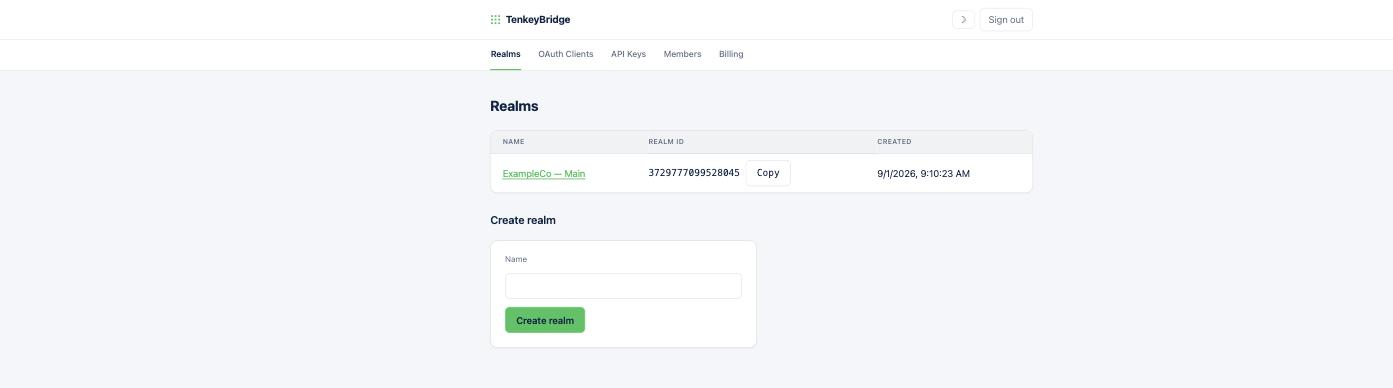
Create and manage your customers' company-file connections — realms, connection status, OAuth clients, and API keys in one place.

PROVEN IN PRODUCTION
A shipped QBO app connected to QuickBooks Enterprise with zero integration-code changes.
Job Workflow PRO — a real, in-production QuickBooks Online integration — pointed its unmodified QBO code path at QuickBooks Enterprise 24 through TenkeyBridge. Customers, sub-customers, 45-line invoices, estimates, payments, and time activities round-tripped through the same code that talks to Intuit. Zero changes. That's the product.
PRICING
Simple, per company file.
Trial
Free
- 1 connection for testing and development
- Free for 30 days
- No per-call fees
- Free developer sandbox, no QuickBooks needed
- Self-serve setup
Production
$44.99
per company file / month
- Pay per company file, not per call
- Typed npm client
- Dashboard: manage, monitor, debug
- Errors with causes, fixes, and doc links
- Free developer sandbox on every plan
- Free until you ship to production
Enterprise
Tailored
- Everything in Production
- Volume discounts for many company files
- Priority support channel
Ship Desktop support this week, not this quarter.
Read the quickstart, point your integration at your free developer sandbox, and see your own JSON come back. No QuickBooks install needed.